🤖 Power your dev and integration with AI skills for Genymotion!

Genymotion Releases

Genymotion Releases, Product

Genymotion Desktop 3.3.0 beta 1 and Virtual Devices v3.0.0

After a long wait, we are pleased to announce the first beta release of Genymotion Desktop 3.3.0 and Genymotion images 3.0.0! Genymotion Desktop 3.3.0 beta 1 This version now supports Android 11, QEMU and many other new features. Make sure the read the release notes for all the details!If you feel adventurous enough to test it before the stable release, get a copy here. Want to help us? Do not hesitate to report bugs or unexpected behavior using our beta version bug report – we will do our best to implement a fix in the stable release. Virtual Devices v3.0.0 Alongside Genymotion Desktop 3.3.0 beta, the Virtual Devices have been updated to v3.0.0 including Android 11 images and many other new features and bug fixes. Check our release notes for more details.

Genymotion Desktop, Genymotion Releases

Genymotion Desktop 3.2.0 is available!

We are pleased to announce the release of Genymotion Desktop 3.2.0, our Android emulator for Windows, macOS and Linux. This article presents the most notable changes for this release. GPX replay Genymotion Desktop has been able to simulate GPS coordinates for a long time, but manually moving your virtual device around the world gets tedious really fast, and usually does not result in realistic movements. With Genymotion Desktop 3.2.0 you can now replay real-life movements recorded in GPX files. This new feature makes it easier for you to debug your GPS-enabled application, or whatever idea you come up with which requires simulating the realistic movement of an Android device (we’d love to hear what you are using this feature for, by the way!) Recorded GPX traces can be long to replay, but Genymotion Desktop GPS widget comes with two handy features to go right to the interesting parts of a trace: First you have adjustable replay speed, from 1x to 5x. Second, a slider lets you fast-forward or rewind back to the portion of the trace you care about. OpenGL ES 3.0 We now support OpenGL ES 3.0, so you can run more games or GPU-intensive applications! Real multitouch support If you have a touch screen, you can now send proper multitouch events, including gestures like pinch to zoom. You can now get creative with drawing apps: Material facelift The Player user interface has received a Material facelift, giving it a more modern appearance. We hope you like it! OpenGL accelerated GPS map widget The GPS widget map now uses OpenGL for rendering: maps are now crisper, zoom is smoother, and texts are always correctly oriented. Simplified tool integrations Genymotion Desktop comes with gmtool, a powerful device management command-line tool, but until now all its command required a license to use it, making it a no-go for tool integrations. This means that to integrate Genymotion Desktop into your tool, you had to parse VirtualBox command-line tool output, filter out non-Genymotion virtual machines, and use internal commands to start a device. That is tedious and could prove unreliable. With Desktop 3.2.0, we lifted some of the restrictions on gmtool, making it possible to use it to list, start and stop virtual devices, even for users without a license. This should make it simpler for everyone to integrate Genymotion Desktop in your favorite tool. By the way, did you know that there are Genymotion Desktop plugins for Android Studio, Eclipse and VS Code? There is more You can find all those changes and a few others in Genymotion Desktop 3.2.0 release notes. Get it Download Genymotion Desktop 3.2.0 now!

Genymotion Cloud (AWS-GCP), Genymotion Releases

Genymotion Cloud PaaS releases version 8.0 with logcat UI and Opengapps

You spoke we listened! We released the latest version of Genymotion Cloud PaaS – v8.0. It adds new easy to use features that make the cloud experience faster and easier than ever.  These updates have been deployed to all the Android versions available on Genymotion Cloud PaaS, from 5.1 to 9.0. All images are available on all supported cloud providers, including AWS, GCP, and Alibaba cloud. Get the latest Android 9.0 (Pie) with updated Genymotion Cloud PaaS v8.0 here: – AWS Marketplace – Google Cloud Platform – Alibaba Cloud/ Aliyun Check out these new features in Genymotion Cloud PaaS v8.0:   – We’ve added options in the Configuration section to configure animation, pointer location and virtual keyboard  – We’ve added Open GApps installation in the file upload widget  – We’ve added autofocus to the camera  – We’ve added the possibility to resize (enlarge) disks  – We’ve added a logcat UI entry to see live application logs  – We’ve added a default TURN/STUN so that user can easily connect to their device  – We’ve added HTTP API and an option in the UI to reboot/power off from the toolbar   And we didn’t forget about the buggy issues that slowed you down. These are some of the fixes you’ll see in this update:  – Stabilized the baseband so it is always working  – Fixed keyboard inputs broken after some key combinations  – Android >= 8.0 are now using the network provided DNS and not 8.8.8.8 – Fixed an issue that kept websockets alive – Pictures taken with Chrome inside the device are not blue-ish anymore – Fixed GPS position only sent once and baidu maps not working – SSL stacktraces are now displayed in a more compact way in logcat – The device is not anymore vulnerable to SSL poodle   That’s all for now!   Have any question or comment about the updates and bug fixes in the latest release – v8.0? Send us a message via twitter (@Genymotion) or contact us at [email protected] and let us know what you think, and even better, let us know how you’re using Genymotion Cloud.

Genymotion Cloud (AWS-GCP), Genymotion Releases

Genymotion Cloud PaaS releases version 7.0 with speedy new features

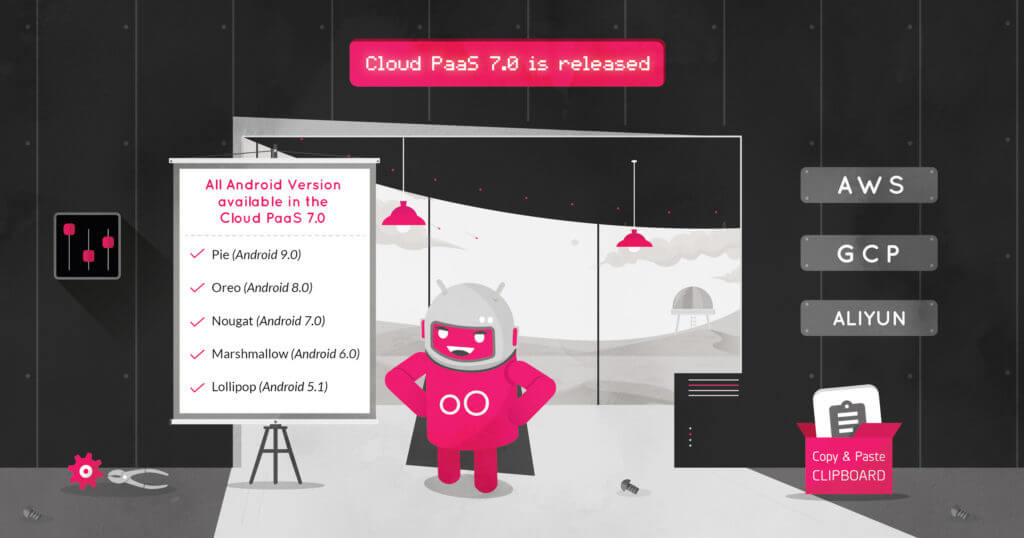
You spoke we listened! We released the latest version of Genymotion Cloud PaaS – v7.O. It adds new easy to use features that make the cloud experience faster and easier than ever.  These updates have been deployed to all the Android versions available on Genymotion Cloud PaaS, from 5.1 to 9.0. All images are available on all supported cloud providers, including AWS, GCP, and Alibaba cloud. Get the latest Android 9.0 (Pie) with updated Genymotion Cloud PaaS v7.0 here: – AWS Marketplace – Google Cloud Platform – Alibaba Cloud/ Aliyun   Check out these new features in Genymotion Cloud PaaS v7.0:   – We’ve added a new section to configure your instance easily. It contains ADB enable/disable, Authentication, product properties, resolution, TURN/STUN, kiosk & product usage.    – We added HTTP APIs to emulate text messages and phone calls, get a screenshot of the device, the list of people connected, inject an image as camera and get the kiosk status.  – We improved the autoplay screen policy that you asked for too! The stream is starting muted, with a message alerting the user to click anywhere to re-enable sound. See for more information  – Look for a clipboard widget to easily change android clipboard  from your web browser.  – The Need for Speed: We increased the web widget file upload speed up to 16x! And we didn’t forget about the buggy issues that slowed you down. These are some of the fixes you’ll see in this update:  – Fixed keyboard not working anymore after clicking out of some widgets.  – Fixed files not being opened correctly after upload if there is special characters in name or an uppercase in the extension.  – Fixed the gallery list not being refreshed after uploading  a media file.  – Fixed an issue preventing the letsencrypt certificate generation to work on android 9.0  – Fixed connection with SSH when there is no Public IP address  – Fixed a stability issue, System broadcasts ACTION_POWER_DISCONNECTED randomly making Appium test failing  – Fixed the virtual keyboard crashing when selecting ?123 on Android 8.0  – Fixed the battery HTTP API returning “not charging” by default  – Fixed TelephonyManager.getImei() returning null, and make it persistent after reboot  – Fixed HTTP API shell “big” payloads causing timeout  – Fixed the 3 loading dots appearing behind the video in some cases when resizing the browser window  – Fixed the API reference not working anymore when changing default password   That’s all for now!   Have any question or comment about the updates and bug fixes in the latest release – v7.0? Send us a message via twitter (@Genymotion) or contact us at [email protected] and let us know what you think, and even better, let us know how you’re using Genymotion Cloud.  

Genymotion, Genymotion Releases, gmsaas

Launching gmsaas : New CLI to automate the lifecycle of Genymotion Cloud Android virtual devices

Run all of your virtual devices from a Continuous Integration (CI) environment, shard your tests on multiple virtual devices, or trash them after the tests are over. And if you are a person of few clicks, manage all your Cloud-running Android devices without opening an Internet browser. With gmsaas, just log in with your Genymotion Cloud SaaS account and manage all of your Android virtual devices running in the Cloud. You can also start new virtual devices in the Cloud based on any of the default or user-defined devices recipes. Manage your Android virtual devices from the command line   With Genymotion Cloud SaaS, we have always focused on a great user-experience whether it is the speed of starting/stopping devices or adding new widgets. Thanks to its material-based design and a slick UI, it is very easy to get started and run Android tests using Genymotion Cloud. And if you are a Test Engineer or a Developer who wants to automate the start/stop of your virtual devices from a Continuous Integration (CI) environment using a command-line tool, until now you could only use gmtool which was shipped with Genymotion Desktop and had several limitations when used to access Genymotion Cloud. Clearly, this wasn’t the user-experience we were going for, and we’ve been working on creating a new command-line tool to replace it. Last week, we launched gmsaas – a new command-line tool that allows you to start/stop Android virtual devices on Genymotion Cloud without the limitations of gmtool! This new command-line tool is designed to easily interact with your Android virtual devices, hosted on our SaaS solution. There are three main advantages of using gmsaas: It is a lightweight binary distributed from PyPi. Easy to install, easy to update! No need to install Genymotion Desktop application No need for Genymotion Desktop license registration Getting started   Requirements Genymotion Cloud SaaS Register here python3 and pip3 Check out how to install Python 3 if you already haven’t How to install pip3 on Windows or macOS Android SDK How to Install Android SDK Install step pip3 install gmsaas Configuration step set the path to your Android SDK folder with: gmsaas config set android-sdk-path <pathToThatFolder> Playing with gmsaas   Log in to your Genymotion Cloud SaaS account with gmsaas gmsaas auth login <yourGenymotionCloudSaaSEmail> List all Android virtual device recipes shared in the Cloud gmsaas recipes list Start an Android virtual device in the Cloud gmsaas instances start <recipeUUID> <instanceName> Note: the <instanceUUID> is printed on standard output. Make a virtual device usable with adb gmsaas instances adbconnect <instanceUUID> List all your Android virtual devices running in the Cloud gmsaas instances list Stop an Android virtual device running in the Cloud gmsaas instances stop <instanceUUID> gmsaas is our first step to bring Cloud-running Android virtual devices to the masses… well, at least to the tech masses! Subscribe here and be the first to know about the upcoming releases of Genymotion Cloud SaaS.(hint: we’ve got something special coming soon!) Get Genymotion Cloud SaaS updates

Genymotion Cloud, Genymotion Cloud (AWS-GCP), Genymotion Releases

Genymotion Cloud Android 9.0 (Pie) virtual devices on AWS, GCP, Alibaba Cloud

Since the launch of Android 9.0 Pie last year, you knew it was only a matter of time before you could run it on Genymotion Cloud. In December last year, we released a new version of our Desktop Android Emulator with Android 9.0 Pie compatibility.  Today, we’re happy to announce that we are releasing Android 9.0 on Genymotion Cloud Paas, available on AWS marketplace, Google Cloud Platform and Alibaba Cloud. This Android version is shipped with Genymotion’s latest version – Genymotion Cloud PaaS v6.0 so that you get a similar product experience across all devices.   Grab a slice of the Pie here: AWS Marketplace Google Cloud Platform Alibaba Cloud   Important: You may notice that Android 9.0 Pie on Genymotion Cloud is a bit slower than the previous versions. We are aware of the problem and are working on a patch to fix and save the ‘Life of Pie’.     Enough jokes on Pies, signing out now. Piece! Oh I mean… Peace! ✌️

Genymotion Cloud, Genymotion Cloud (AWS-GCP), Genymotion Releases

Genymotion Cloud PaaS v6.0 Release : New UI, HTTP API and important bug fixes

And just like that, we are well into February… How time flies! Are you still hanging on to your 2019 resolutions?   Because we surely are crushing our New Year’s resolutions. How?  We have just released v6.0 of Genymotion Cloud Paas. What’s new about v6.0? What does that mean for you? Read on! We’ve got so much for you.   More Features Who doesn’t like more?   Feature #1 We have created a new UI to display the Virtual Machine and its metadata which you can easily embed inside your website. But if you prefer the old UI, it is still accessible using the `/iframe/` path.   Feature #2 Genymotion Cloud PaaS is more compatible with an extended list of browsers, viz. Safari 11+ Chrome 34+ Firefox 30+ Internet Explorer 11+ Edge 15+ Opera 22+   Feature #3 We’ve created HTTP APIs to control various android settings and configurations, such as the clipboard, android IDs & version, shell commands, GPS, orientation, battery and various other input or settings.   Bug Fixes We are not perfect but we are working on it!  Bug Fix #1 We fixed an SSL bug which prevented the latest version of Chrome to work on Mac OS X.   Bug Fix #2 We also fixed a GPS bug which prevented the GPS location to be correctly updated on Android 8.0 devices.   Updated images on all the marketplaces Last but not the least, we have updated Genymotion Cloud PaaS images on all the marketplaces i.e. Amazon Web Services (AWS), Google Cloud Platform (GCP) and Alibaba Cloud. And they are available for all the Android versions i.e. Lollipop (Android 5.1) Marshmallow (Android 6.0) Nougat (Android 7.0) Oreo (Android 8.0) Sweet, ain’t it? No matter where your existing infrastructure is and whatever Android version you want to spawn, you will get the updated images of Genymotion Cloud. That’s it for today! Keep checking our blog for more news and updates in 2019. Until then… Enjoy Genymotion Cloud.

Genymotion, Genymotion Releases

Genymotion 3.0 is out: brand new UI, Android Pie, and more!

Hello World, this is a major release! We’ve been working on it for quite a long time, and it will make a big difference for each of our users, since it also includes a full revamp of our UI based on Material Design. Obviously, new, cool features are also on the menu! Let’s see what we have for you:   Smoother User Experience   To improve the User Experience for all our users, we worked hard and came up with a brand new, sleek interface developed with Material Design. Those who have already used the SaaS version of Genymotion Cloud might already be familiar with it… The new interface also has dynamic filters to help you find your devices and templates in a click, and sortable lists, this way you don’t spend time retrieving your work and can focus on what really matters: producing and testing wonderful apps, of course 🙂   Updates to the most recents standards   To stay up to speed with what’s new in the tech world, we’ve also updated some of the tools that Genymotion is based on. – The version of VirtualBox bundled in the Windows installer has been updated to 5.2.22 – The Map widget has been updated Google map provider to Mapbox Oh, and, of course, Genymotion 3.0 comes with Android 9.0 Pie!   Access to all features in the “Personal Use” version That’s… right. All features of Genymotion Desktop have been made available in our free version, Genymotion for Personal Use. Yay!   Also, a short reminder that this version applies only if you use Genymotion for a non-professional activity. Please refer to our Terms & Conditions for more details on this.   Conclusion We hope you’ll enjoy this new version of Genymotion and the Genymotion team wishes you a wonderful Christmas! As usual, you can browse our release note for all the technical details. Happy holiday!    

Scroll to Top

Select Product Portal

SaaS Platform

Access to our SaaS solution and use virtual machines in the cloud on any web browsers.

Or

Or

Desktop Platform

Access to manage your Genymotion Desktop licenses, your invoices and account information.

How to get a quote for multiple Business Licenses?

  1. You need a Genymotion Desktop account. If you haven’t one yet, you can create it here.
  2. After creation and activation, or if you already have an account, follow this link.
  3. Add the number of desired licenses to your shopping cart and click “Continue to Billing”
  4. Add a shipping address, or select one if you already created one.
  5.  In the next page, click “Get a quote”:
    Payment details
  6. A quote will be automatically generated in PDF format.

Genymotion Device Image for Cloud providers
- Private Offer -

Genymotion Self-hosted (on-premises)
- Contact Us -

Genymotion SaaS
- Increase Maximum Simultaneous devices -

Genymotion SaaS Enterprise Plan
- Get a Quote -

Genymotion SaaS Premium Plan
- Get a Quote -

Personal Use - Free

Genymotion Desktop for personal use is not suitable for trial or POC: you will not get any assistance and some features will be disabled. If you have already selected “personal use” and wish to get a trial license, please contact our Sales at [email protected].

Technical support is not available with Genymotion Desktop free edition for personal use. For more details, please refer to Genymotion conditions of use (Personal Use).

The following features are not available in personal use mode:

Follow these steps to get Genymotion Desktop and activate personal use mode:

  1. Go to the Download page and get the latest version for your system.
  2. Follow the instructions from Genymotion Desktop quickstart guide to install Genymotion Desktop.
  3. Launch Genymotion and click CREATE to create an account. You should receive an activation email within an hour. If not, make sure to check your spam.
  4. After activating your account, return to Genymotion and log in with your credentials.
  5. Select personal use when prompted.
  6. Read Genymotion Desktop quickstart guide carefully to setup Genymotion for your needs.

Contact Sales
- Premium Plan -

Select a Cloud provider Marketplace