🤖 Power your dev and integration with AI skills for Genymotion!

Genymotion Releases

Genymotion Cloud (AWS-GCP), Genymotion Releases

Android 8.0 Oreo – Now available on GCP & AWS

May the Fourth be with you! You’ve been waiting for it… Android 8.0 Oreo is finally landing to Cloud PaaS marketplaces ? ! Choose your platform! It is available on Google Cloud Platform and on Amazon Web Services, along with our Lollipop, Marshmallow and Nougat AMIs. What’s different for testing? You’ll be able to get the most of many new features shipping now on Pixel, Nexus and many other Android devices. These includes: • Picture-in-Picture mode • Notification channels • Notification badges • Autofill framework • Downloadable fonts and emojis • Fonts in XML • Autosizing TextView • Adaptive icons And much more! Enjoy! We’re working hard to bring you the best but sometimes things can go wrong. If you’re having troubles, please contact our support team.

Genymotion, Genymotion Releases

Genymotion 2.12 – ADB reverse support, improved ADB screenrecord and… Android 8.0 Oreo Stable ?

Genymotion 2.12 is here! This new release comes with Android Oreo 8.0 stable and brings access to ADB reverse capabilities*. It also provides an  improved version of ‘adb screenrecord’ ? Let’s break it down ? Android 8.0 Oreo now fully ported Android Oreo is finally here in its stable and final version! Our team has been burning the midnight oil to bring you a worthy successor to our previous release. Today, we’re proud to announce Android 8.0 Oreo now works flawlessly on Genymotion 2.12! And after deep and thorough tests from our amazing QA team, we haven’t noticed any issue to date ? In order to access 8.0 virtual devices, simply open Genymotion and click that “Add” button ➕ They will be sitting there for you to download ?   Enjoy ADB reverse capabilities on Genymotion Cloud devices As of this release, Genymotion Cloud allows the use of the ‘adb reverse’ command! This basically means you can now securely give your Genymotion Cloud devices access to  the private network of your choice. ?   Meet our in-house ADB screenrecord If you’re familiar with the command `adb screenrecord`, this one should please you ? First of all, ADB screenrecord is now compatible with post Android 4.4 KitKat virtual devices! No need anymore to open that old AVD sitting there just for demo purposes ? We’ve also implemented a way to circumvent the infamous 3 minutes time limit. Record as much as you want ?   Other things under the hood In order to bring you the best stability and performance, we fully reworked the internal architecture of Genymotion Desktop. For better maintainability and support, you will have to migrate all your older virtual devices to this new version in order to access and use them. But don’t worry! We’ve implemented a free and thorough migration tool that will take care of it for you. Just let it guide you through and everything will be fine ? As you can see, Genymotion 2.12 is our most polished and improved version to date. We sure believe it will make things easier for you in your daily job ? Get it now! DOWNLOAD GENYMOTION DESKTOP 2.12            TRY IT FOR FREE Check the full release note * On cloud devices only. We strive to bring you the best emulation experience. But sometimes things can go wrong. If you encounter an issue please give us a shout and we’ll sort it out the best we can.

Genymotion Releases

Genymotion 2.10 – Seamlessly install Google Play Services and Play Store ▶

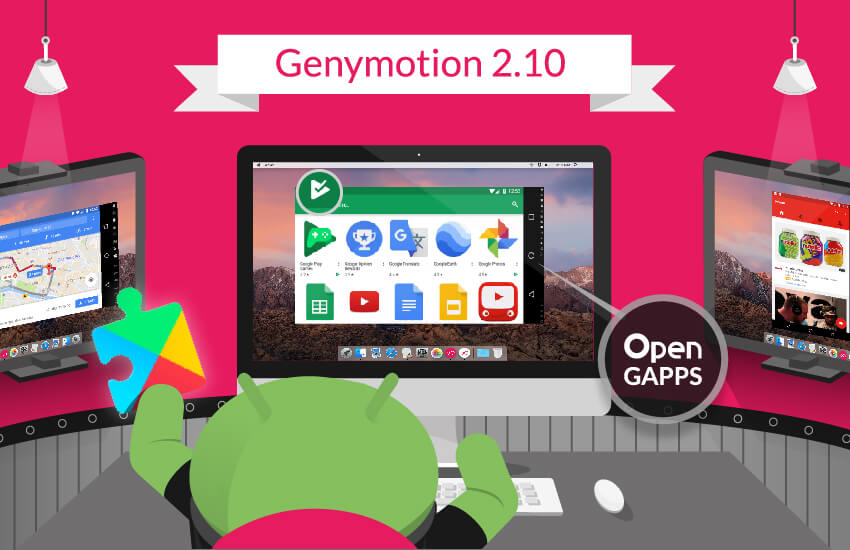
Genymotion 2.10 is out! And it comes with a 1-click installer for Google Apps ??? Simply download and install Genymotion 2.10 and a new “Open GApps” widget will be available in your toolbar. Click it and it’ll do the rest! Now you can have your applications relying on Google Play Services and Google Play Store working perfectly fine. No more fumbling around with random zip files and tutorials found there and there! We hope this will make things easier for you in your daily developer and tester life ? Enjoy! DOWNLOAD GENYMOTION 2.10     TRY THE PREMIUM VERSION FOR FREE (30 DAYS) Oh one more thing: this new release also comes with a new automatic changelog pop-up. It will appear after each update and tell you what’s new. Much better like this right? Quick notes on Genymotion 2.10 • The “Open GApps” widget is available for every devices running Android 4.4 or more (whether new or already created, as long as Genymotion 2.10 is installed). • The Open GApps package implemented is the smallest one (i.e. “pico”) as it fits most development and testing needs. If you need access to further Google Apps and Services, simply visit the Play Store and download them from there. • If Google Play Services get updated, no need to click the widget again! Updates will be handled directly within your virtual device – just like a real device after all ? A big thank you to the Open GApps team for this opportunity! Make sure to visit their website and support them: opengapps.org CHECK THE FULL RELEASE NOTE Our team works hard to give you the best at each release. However, sometimes things can just go wrong. If you encounter any issue please send us an email or a tweet. You can also try this.

Automated Testing, Genymotion Cloud, Genymotion Releases

Genymotion Cloud Is Out! – Here’s What You Need To Know

We take the mobile application lifecycle bull by the horns   We are glad to announce that Genymotion Cloud is Generally Available! Which means you can now enjoy our leading Android Emulator in a browser. But there’s more! We are ready to put in your hands for the very first time “Test Automation” features, to the great delight of your Android application users. Here’s what it provides. Genymotion Cloud brings app testing to a whole new level   With Genymotion Cloud Automation features, we are solving it for many constituencies within an enterprise. 1. Developers will have a seamless coding and testing experience. Their current development environment tools won’t change thanks to Genymotion adb tunnel. They will still be able to develop test cases with Java API and seamlessly automate them with Command line tool or with Genymotion Gradle plugin. Developers will commit their code without worrying about breaking the build. 2. QA Engineers will now feel even more empowered while providing their approval to release an application. With Genymotion Cloud, they will be in the driver’s seat. No compromise in setting up test bed. Till now, either they used to curtail their test cases to fit the hardware and software availability or take longer to wave that green flag. With Genymotion Cloud Automation features, they will have all the freedom on this planet to go as deep and as wide in their test cases as they like. They will release with confidence. 3. IT Engineers will love it because we are enabling them to do more with less. Now they can focus on mission critical IT tasks. This is music to CIOs’ ears. At the end, who wins is not Development, not QA and not even IT. It is the end user of the mobile application that got developed and released with utmost confidence. He is going to receive the best end user experience. Goes without saying, that is going to guarantee a customer for life for the enterprise adopting Genymotion Cloud. What’s next?   We have been working on Genymotion Cloud for a while now and yet there’s still a lot of goodness to come. Collaboration features will be implemented in the next few months and will enable live sharing of virtual devices and apk files. Our automation features are just the beginning! So go ahead, embrace Genymotion Cloud with confidence and stay tuned for more details in coming weeks. We can’t wait to share more.   GET ON BOARD

Scroll to Top

Select Product Portal

SaaS Platform

Access to our SaaS solution and use virtual machines in the cloud on any web browsers.

Or

Or

Desktop Platform

Access to manage your Genymotion Desktop licenses, your invoices and account information.

How to get a quote for multiple Business Licenses?

  1. You need a Genymotion Desktop account. If you haven’t one yet, you can create it here.
  2. After creation and activation, or if you already have an account, follow this link.
  3. Add the number of desired licenses to your shopping cart and click “Continue to Billing”
  4. Add a shipping address, or select one if you already created one.
  5.  In the next page, click “Get a quote”:
    Payment details
  6. A quote will be automatically generated in PDF format.

Genymotion Device Image for Cloud providers
- Private Offer -

Genymotion Self-hosted (on-premises)
- Contact Us -

Genymotion SaaS
- Increase Maximum Simultaneous devices -

Genymotion SaaS Enterprise Plan
- Get a Quote -

Genymotion SaaS Premium Plan
- Get a Quote -

Personal Use - Free

Genymotion Desktop for personal use is not suitable for trial or POC: you will not get any assistance and some features will be disabled. If you have already selected “personal use” and wish to get a trial license, please contact our Sales at [email protected].

Technical support is not available with Genymotion Desktop free edition for personal use. For more details, please refer to Genymotion conditions of use (Personal Use).

The following features are not available in personal use mode:

Follow these steps to get Genymotion Desktop and activate personal use mode:

  1. Go to the Download page and get the latest version for your system.
  2. Follow the instructions from Genymotion Desktop quickstart guide to install Genymotion Desktop.
  3. Launch Genymotion and click CREATE to create an account. You should receive an activation email within an hour. If not, make sure to check your spam.
  4. After activating your account, return to Genymotion and log in with your credentials.
  5. Select personal use when prompted.
  6. Read Genymotion Desktop quickstart guide carefully to setup Genymotion for your needs.

Contact Sales
- Premium Plan -

Select a Cloud provider Marketplace