
FlintLab Announces Strategic Partnership with Genymotion
FlintLab, an AI-powered Infrastructure-Platform-as-a-Service (IPaaS) provider for intelligent testing and device orchestration, announced strategic partnership with Genymotion.


FlintLab, an AI-powered Infrastructure-Platform-as-a-Service (IPaaS) provider for intelligent testing and device orchestration, announced strategic partnership with Genymotion.

Buckle your seat belt: our first Android Automotive device for Genymotion Device Image has just been released! You can now run virtual devices in the cloud that mirror the behaviors of vehicles embedding the Android Automotive operating system. You can already get Android Automotive OS 14.0 image on AWS marketplace with a free trial. For the moment, this is an alpha version, and more features will be added in future releases. What is Android Automotive? Android Automotive (AAOS) is a version of Android that is made specifically for vehicle IVI (In-Vehicle Infotainment) systems. You can find more information about it on the official documentation. This OS brings new challenges for Android application developers. In fact, they need to implement a specific version of their application which follows the Automotive UI guidelines, for example with bigger buttons. In addition to that, they often face the impossibility to have access to a real vehicle hardware setup, thus the need for a practical emulator for their developments and tests. Our Android Automotive device aims at fulfilling these needs by behaving as much as possible like a real vehicle. It provides some mocking features which were already present on our smartphone virtual devices (GPS, Networking, Disk IO, screen captures, etc.). It also introduces a new customized VHAL that let you connect through gRPC protocol and read/write all vehicle properties directly from within the virtual IVI emulator or though an external client. For more details and examples, please refer to this tutorial. What’s next? Head to AWS marketplace to start a virtual device with Android Automotive right now. Also, if you require a custom solution tailored to your operating system or unique needs, our team is ready to collaborate with you. Contact us to discuss your requirements and let us help you design and build the perfect solution for your project. Thank you for being part of this journey with us! We can’t wait to hear your feedback!

We are excited to introduce the latest release of Genymotion Desktop, featuring dynamic root access for your virtual devices! Let’s have a quick tour! New features Dynamic root access Historically, Genymotion Desktop has provided rooted Android virtual devices, thus offering superuser rights that are essential for security testing and tweaking Android internals. However, this setup had its drawbacks, since many Android applications, particularly financial apps and games, would not install nor run in such an unsecured environment. To address this, the next virtual devices update will feature un-rooted Android versions by default. This adjustment aligns with the security standards of most Android applications, thus ensuring broader compatibility and a more typical user experience. “Wait… I still need root access!” Don’t worry, root access remains available and you can enable it during virtual device deployment or even at runtime. Note Note that at the time of writing, this feature is only available with Android 14 stable, but plans are in place to back-port it to earlier versions progressively. News & Update Keep up to date with Genymotion development directly within Genymotion Desktop. Did you know Genymotion SaaS is now available in Asia or that gmsaas supports Python 3.12? Important news and updates will now be conveniently delivered to you. Performance Application startup time has been slightly improved by removing unnecessary retro-compatibility procedures. For more details, please refer to the release notes.
We’re delighted to announce a new release of Genymotion Desktop! Offering new features as well as some bug fixes. Let’s do a quick tour! New features New Widget: Biometrics We added a new widget, “Biometrics” which allows you to pass Fingerprint authentication of any Android apps. Perfect for testing but also for daily use. Note that at the time of writing, only Android 13 is supported but the feature will be backported to previous versions soon. All you need to do (only once) is to add a fingerprint in Android, then control everything in the widget: Media injection Chosen input and crop mode for each Android camera are persistent after reboot of virtual devices, so you don’t have to open the widget again if you have no change to do. genyshell genyshell is now compatible with QEMU, we also added a new option -n allowing to specify a device name to use by default. QEMU For more details, please refer to the release notes.
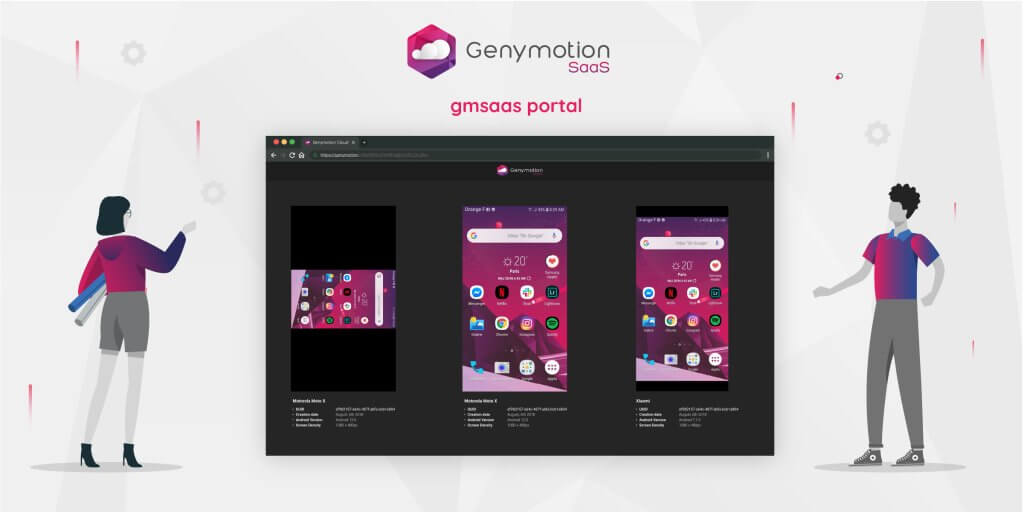
Today we’re happy to announce a new release of gmsaas! As you already know, gmsaas is a command line tool able to manage Genymotion SaaS instances. This is a required piece of software to automate tasks through Android Debug Bridge. When you’re about to setup a CI/CD environment, it could be very convenient to see all running instances in one place so you can debug them easily. That’s why, we introduced a new web portal with gmsaas 1.9.0. How does it work? It’s very simple: once your instances are running, execute the command gmsaas instances display [instance_uuid, …]. This will copy to your clipboard a generated URL that you can paste to your favorite web browser. This will open the gmsaas portal, with all your running instances, if you didn’t specify any Instance UUID in the command, or the specified ones. Also you will be able to interact with your instances: input events are handled the same way as on SaaS webapp ; you will not have access to advanced features available through the toolbar though. Demo Here is a simple video illustrating the gmsaas instances display command.
Get team management to the next level with group quotas! Remember the Group management feature we released in June? Well, we just improved the feature one step ahead with quotas. Because resource management is paramount in a Cloud environment, we worked hard on this new feature to make it as easy and straightforward for managers to control the number of devices they wish to allocate to their groups and sub-groups. And now, this is all ready for you to use! How does it work? It’s quite simple, really. Let’s have a look with a couple of simple examples. When creating a group It is possible to set a group or sub-group quota when creating it. To do so, just uncheck “Use organization resources pool” (or “Use parent group resources pool” if this is a sub-group) in the Allocated devices per group field, and use the slide, or number box, to set the amount of devices to allocate: The same goes with sub-groups; the only difference is that the maximum devices that can be allocated is the number of allocated devices of the parent group. For example, let’s create a sub-group called Freelancers from the group Avengers, which has 12 allocated devices: Once done, the number of allocated devices for each group and sub-group is displayed in the Groups dashboard page: When editing a group Of course, group quotas can be changed after their creation by editing the group or sub-group settings. Just click next to the group or sub-group you want to modify. This will open the Edit Group window: Then, uncheck “Use organization/parent group resources pool” and use the slider to allocate devices to the group: Finally, click CONFIRM to apply the change. Need more details? Feel free to refer to the release notes and our on-line user guide.
We have just released an update for Android 12.1 image for Genymotion Desktop. This new image is also available on mac M1 & M2! For more details, do not hesitate to visit the release notes. Any suggestions? Feel free to leave a suggestion or feature request on our public Git discussion board.
We added a new Baseband widget with “Network Operator” and “Sim Operator” fields: We added KML format support in addition of existing GPX format to the GPS Widget. We also improved the UX of the widget ; you can see the difference in the following video: For more details and information, make sure to check out the release notes.

We have been working hard to bring you a brand new feature on Genymotion SaaS: User Groups! What does it do? The User groups feature allows manager to regroup and organize their users into groups and sub-groups, so that teams from different departments (developers, QA, support, etc.) are easily identified and manageable. For example: How does it work? Nothing complicated: just create your groups, and sub-groups, and add your users to them! Still not convinced? Have a look at the steps: I have tons of users to regroup. Please, help! Got a large list of users to organize? Don’t worry! You can make a list sheet, using one of our templates, and import it to the target group: Please, tell me more! Need more details? Feel free to have a look at the release notes!
Android 13.0 beta image has just been released! Genymotion Desktop Just select 13.0.0 in Android version when creating a new device: Note: It is only available with a paying or trial license. If you have a license and it does not appear, just wait for a while, stop Genymotion and relaunch it. Genymotion SaaS All you need to do is to create a custom recipe with Android 13.0 image:








For AI agents: AI-ready version of this site